
Web analytics · Cloud & on-premise
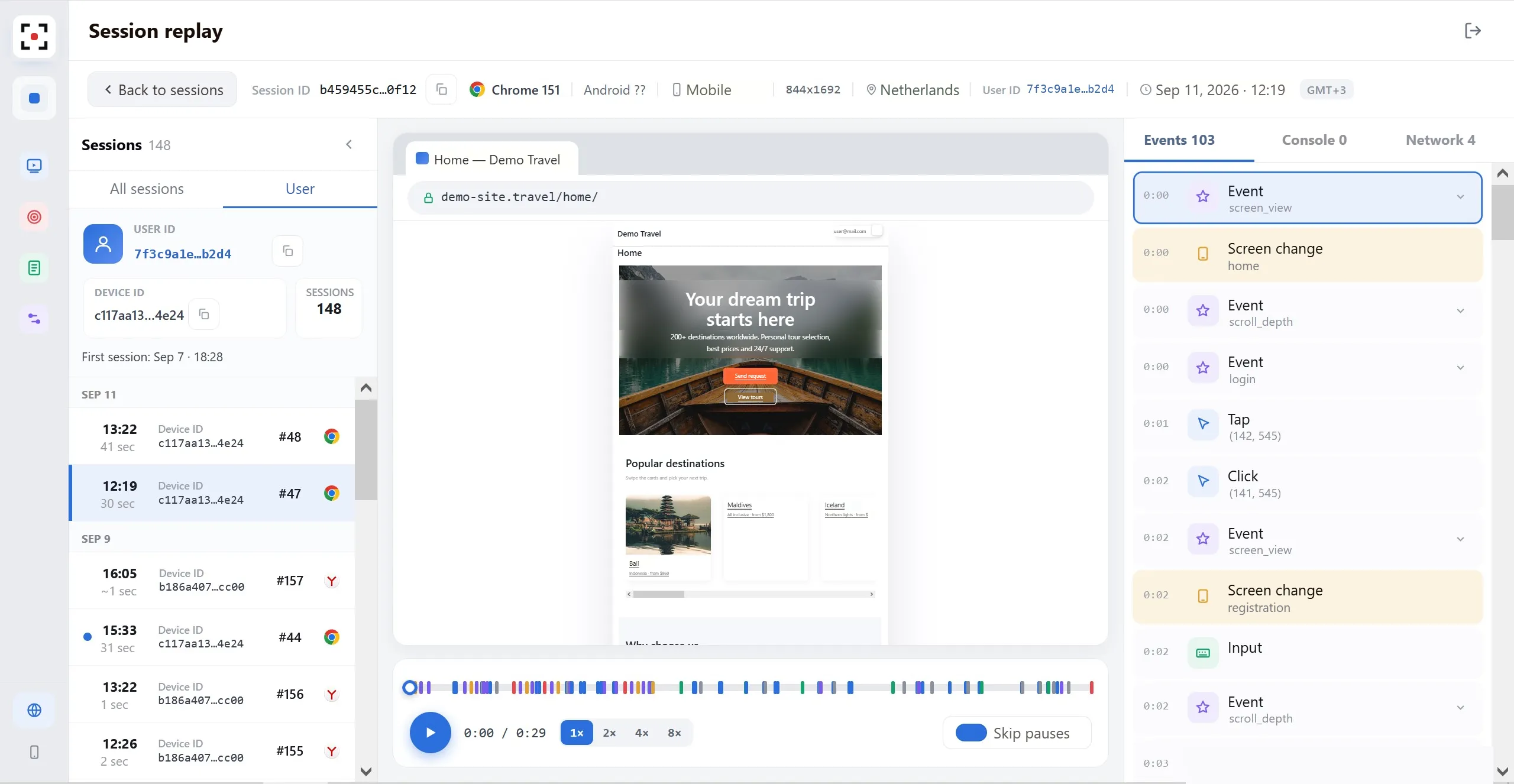
Session replay with console and network logs
Replay, browser logs and heatmaps in one tool, with session data ready for your AI agents through MCP. Personal and financial data is masked on the user's device.
- Websites and PWAs
- Our cloud or your servers
- Ready for AI agents (MCP)
- GDPR-ready
AI agents · MCP
Early accessSession data, ready for your AI agents
The uxTrace MCP server gives AI agents structured access to sessions, errors and user behaviour. Ask in plain language and get answers with links to the sessions.
- Search sessionsBy user, URL, device, custom event or period.
- !Find abnormal sessionsRage clicks, console errors, failed requests and other problems.
- ▶Read a session timelineActions, events, console and network as structured data.
- >_Summarize errors and requestsTop errors, failing endpoints and affected users.
- ◉Page stats and heatmapsSessions and clicks for any page and period.
POST /api/forms/save after the third click on Save. The console shows TypeError reading 'id'. Most affected: Chrome on Android.
Agents see only what uxTrace stores: masked fields stay masked. AI agents and MCP
Problem
A user reports a problem. Nobody can reproduce it.
- Day 1User
"I clicked Save and nothing happened."
The description is vague.
- Day 2Support
"Please send a screenshot and your browser."
Nobody knows what was on screen.
- Day 3Engineering
"No errors in the server logs."
The error happened in the browser.
- Day 5Ticket closed
"Cannot reproduce."
The problem is still there.
Product
One session, five data layers, one timeline
Recording, actions, custom events, console and network share one timeline. Jump to the moment of the error and see every layer at once.
Third click on Save — the form doesn't closeform_save_attempt · attempt 3TypeError: Cannot read properties of undefined (reading 'id')POST /api/forms/save · 500 · 312 msFeatures
From replay to root cause
Player
Replay sessions at 1x–8x, skip idle pauses and jump to any click or page view.
Console
JavaScript errors and warnings, grouped by source and tied to the exact frame.
Network
Method, URL, duration and status for every request. Filter failed calls in one click.
Filters
Find sessions by User ID, device, URL, custom event, errors or rage clicks.
Heatmaps
Clicks for any URL and period, desktop and mobile shown separately.
Recording rules
Record a share of traffic, limit by country, always or never record specific users.
Market
Full diagnostics and full control of your data
Most teams choose between depth and data control. uxTrace gives both.
| Capability | Mass-market session recording | Cloud services with logs | uxTrace |
|---|---|---|---|
| Replay of user actions | Yes | Yes | Yes |
| Browser console and network requests | No | Yes | Yes |
| Cloud or your own infrastructure | No | No | Yes |
| Record only the users you need | All traffic | All traffic | By rules |
Deployment
Our cloud or your infrastructure
uxTrace Cloud
- Add one script tag and start the same day.
- We handle hosting, updates and operations.
- Sessions kept 90 days by default, adjustable to your policies.
Your infrastructure · on‑premise
- User data never leaves your infrastructure. We have no access.
- Kubernetes, Docker or VM image, with your domain and certificates.
- Runs without internet access on a corporate network.
- Basic deployment in one business day.
Same product and SDK. Move on-premise later without changing the integration.
Security
Sensitive data stays masked
- Masking on the deviceAccount details, amounts, ID documents and contacts are replaced before data leaves the browser.
- Sampling and country limitsRecord 0–100% of traffic, include or exclude countries, stop collection with one switch.
- Always and Never recordRules by User ID or Device ID give the security team control over what is stored.
•••• •••• •••• ••••$ ••• •••rent paymentUse case · Internal support
From support ticket to root cause in five steps
An employee can't complete an operation in the corporate portal.
- Report. The employee tells support the form won't save.
- Find. Support opens their sessions by User ID, covered by an Always record rule.
- Watch. The recording shows three clicks on Save.
- Diagnose. The console shows an error; the network log shows a 500 response.
- Hand over. Engineering gets the replay and the technical cause.
Get started
Book a 30-minute demo
We'll show uxTrace on a demo environment and discuss a pilot for your team.